

 |
 |
Easily convert files to MP3!
Would you like to convert the audio on your computer to MP3 format, including the odds and ends, different formats, different volume and sound quality? Extract audio from video files? Or do you think it would be too much hassle? Think again! Easy MP3 converter will make the whole process as easy as 1, 2, 3!
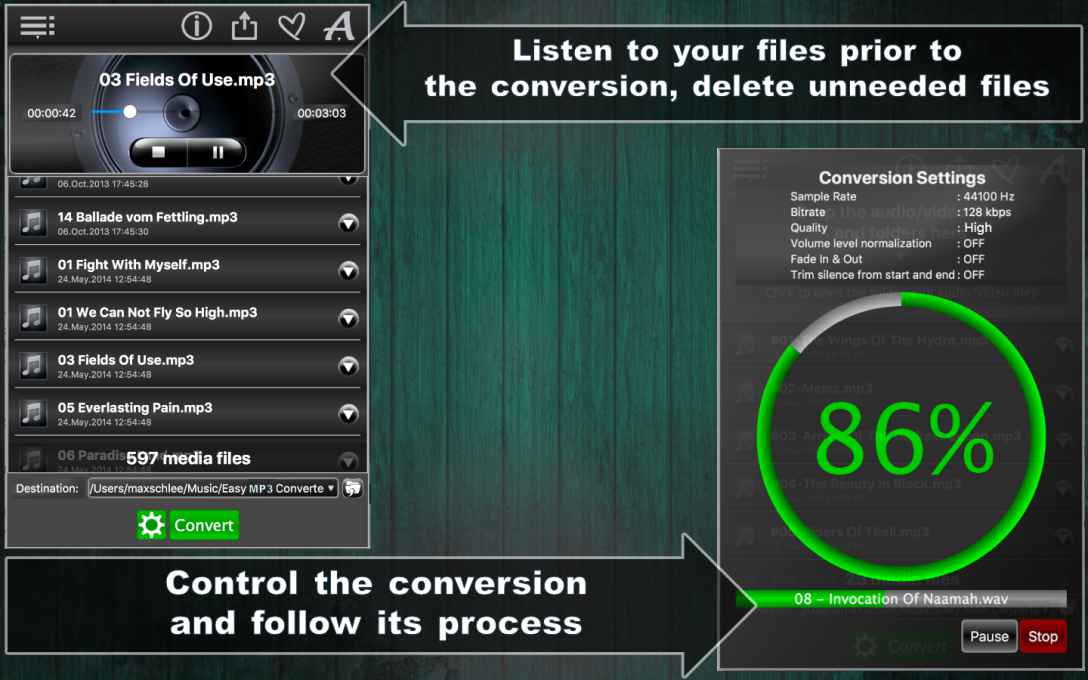
Step 1: get your audio/ video files and let’s get started! Easy MP3 Converter lets you process mp3, mp4, wav, aiff, caf, mp2, mp1, aac, au, m4r, ts, mov, qt, mpg, 3gp, ac3, m4v, bwf, 3gt, vob, amr, 3ga, awb, au, snd, adts and m4b formats. You can convert an unlimited number of files simultaneously, so drop as many files as you want into the app window. You can play any of the files before you convert them using an embedded player, to give you an idea of what improvements you want to make to those files (e.g. sound quality, stereo or mono track channel etc.) If you accidentally dropped a wrong file into the app, you can remove it with one click.
Step 2: If you want to customize your results, go to Settings. You can set the Sample Rate from Voice Quality to Studio Quality and anything in between. Adjust Bits per Sample and Channels. Choose between various Source/Destination settings and what you want the app to do after it completed converting your files to MP3 (“After Conversion” options). Choose between Play Sound, designating and opening the destination folder for your converted files. Or, if you want to play around with different settings and files, clear the list and start over!
And now, the easiest step of them all: press Convert and experience your files in MP3!
Download Easy MP3 Converter now and enjoy the really, really easy way to convert audio files!
The free version of this app you can WATCH here!



Download as PDF file


I just purchased Easy MP3 converter and when I convert the Mac System sounds of Tink.aiff and Pop.aiff both of them have no output sound in the end. I have adjusted the settings in multiple ways and everytime there is no output. /System/Library/Sounds/Tink.aiff
Please help, Adam
Dear Adam,
thank you very much for your feedback. We could reproduce it, the duration of the audio files are less than 1 second. We will investigate it and fix it in the future app updates.
I bought the Easy MP3 converter to convert MP4 protected files to mp3 so I could play the iTunes music on a flash drive. It looks like this app cannot do that as when I drag my iTunes songs to the converter app they won’t load.
Dear Richard,
the DRM files of any type are not supported. Please, read the description of the “Easy MP3 Converter” in the app store
I’m currently running macOS Majave and haven’t upgraded to Big Sur yet. Before I buy your product, I wanted to confirm it will work in a month or so after I upgrade. Your requirements are not listed. And Apple on says “works on this Mac.” I’m using the free version now but want to upgrade. I like it.
Thanks
Dear Tom,
yes “Easy MP3 Converter” is tested on the macOS Big Sur and works fine on Intel as well as on the new Apple Silicon M1 processors.
I purchased this application to convert wma files that I copied from my CD collection using a Dell PC. So far, I have been unsuccessful in converting these to MP3 files using my MacBook Pro. Please provide me step-by-step instructions so I can determine what I am doing wrong.
Thanks.
Dear Andy,
the “Easy MP3 Converter” currently does not support the WMA format. All supported audio formats for input are listed in the description and the screenshots, of the app at the current moment these are mp3, mp4, wav, aiff, caf, mp2, mp1, aac, au, m4r, ts, mov, qt, mpg, 3gp, ac3, m4v, bwf, 3gt, vob, amr, 3ga, awb, au, snd, adts and m4b formats.